Built from the real work, not in abstraction
I learned the workflow before I designed anything, first by interviewing the front-desk employee and then by working the front desk myself.
I interviewed the front-desk employee about how appointments actually got ready: appointment preparation, vaccine verification, scheduling, client communication, forms, check-in and check-out, recurring pain points, and the coordination work in between.
After the front-desk employee left, I stepped into the role myself, and I have kept doing the work regularly for several months. The owner and staff supplied the operational knowledge, business constraints, and practical feedback that shaped what I built.
What the interviews surfaced
- Vaccine checks meant opening appointments and pet records one at a time
- Staff had to inspect each required vaccine and its expiration timing
- Missing records created extra client-communication work
- New bookings could mean checking again
- Nothing gave a reliable, shared view of where each task stood
Work I now do myself
- Vaccine verification and vaccine-record handling
- Drop-off forms
- Scheduling
- Client texts and calls
- Check-in and checkout
- Estimates and invoicing
- Bath-board planning
- Related front-desk coordination
First-hand perspectiveI didn't design the dashboard from requirements alone. I worked the workflow myself.
Master Tracker — shared operational view
The Master Tracker answers one question, what needs attention?
Before it existed, staff kept track of appointment preparation by repeatedly reopening GroomMore and leaning on memory, handwritten notes, and separate checklists, then checking again throughout the day.
The harder problem was uncertainty. Staff couldn't reliably tell an appointment they had already reviewed from one added later, or from one still waiting on action, so the safe response was often to recheck a broad stretch of the schedule. The Master Tracker keeps each appointment's preparation state visible to the whole team.
Master Tracker
What needs attention?
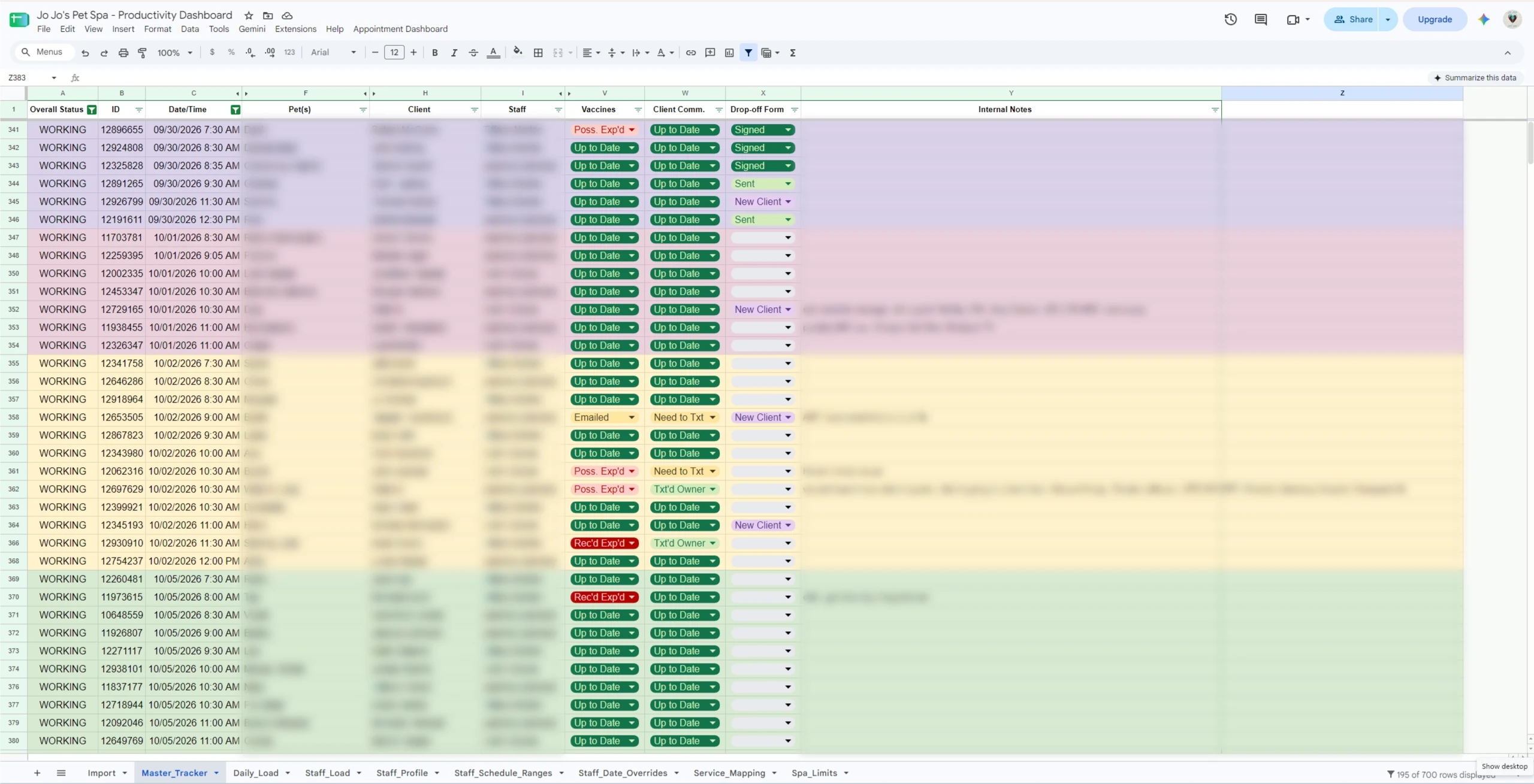
The Master Tracker consolidated work that had previously required repeated record checks, handwritten notes, memory, and separate checklists.
View full-size image of the Master Tracker (opens in a new tab)
Before: how staff kept track
- Reopening GroomMore repeatedly
- Memory
- Handwritten notes
- Separate checklists
- Rechecking throughout the day
In the Master Tracker
- Appointment status
- Vaccine status
- Client communication status
- Drop-off form status
- Preparation state that persists across the team
- Exceptions needing attention
- ExportRun an appointment report from GroomMore.
- PastePaste it into the designated Google Sheets input area.
- ImportRun the import action.
- OrganizeAppointments are organized by date.
- See statusColor-coded statuses become visible in one shared operating view.
- TrackStaff track preparation and follow-up work from that one view.
Reconstructed for portfolio presentation based on original project work and surviving notes. Not a screenshot of the tool.
From problems I experienced to design decisions
Each part of the system answers a problem I saw in the interviews or ran into myself.
Problem
Reopening individual records
Design response
Consolidated appointment tracker
Problem
No persistent vaccine-check state
Design response
Vaccine-status tracking
Problem
Difficult to remember client follow-up
Design response
Communication-status tracking
Problem
New bookings created uncertainty about what had already been checked
Design response
Newly imported or unresolved work remains visible until reviewed
Problem
Hard to see what days could accept more work
Design response
Integrated Daily Load view
Problem
Staff schedules and exceptions constantly changed
Design response
Staff profiles, recurring schedules, and date-specific overrides
Vaccine status review: before and after
Veterinarian outreach didn't go away. The repeated status check did.
Under the old process, keeping vaccine status current meant reviewing a rolling two-week window of appointments, one appointment and one pet record at a time, twice every operating day. The Master Tracker doesn't remove the rest of the vaccine work. What it removed is re-reviewing the same appointments just to find out where things stand.
Before: rolling-window review
- Open the rolling two-week schedule
- Open an appointment
- Open the individual pet record
- Inspect vaccine status
- Remember or write down the current state
- Continue across the two-week window
- Repeat the same rolling-window review twice each operating day
After: Master Tracker
- Import or update appointment data
- Review the appointment
- Status persists
- New and unresolved appointments remain visible
- Act only where attention is required
Still done by hand. Contacting veterinarians for missing records, processing the records that come back, and entering updated vaccine information. The savings below come only from eliminating repeated status review.
~12staff hours/month
saved from repetitive vaccine-status review
~96%
less repeated vaccine-status review effort
Covers repeated vaccine-status review only, not total front-desk, scheduling, or vaccine-administration labor.
How this was modeled
- About 188 appointments per month
- The salon is open five days a week
- The previous process reviewed a rolling two-week appointment window, with two full review passes per operating day
- Measured previous review rate, about 12 seconds per appointment per pass
- Measured dashboard review, about 9 seconds per appointment, once
Excluded. Time spent emailing or requesting records from veterinarians and entering updated vaccine information, because that work still happens.
A model built from measured task times and observed appointment volume, not a formal study.
The simplest technology the team would actually adopt
The goal was never to build software for its own sake.
I chose Google Sheets on purpose rather than building a custom web application. A standalone application would have added hosting, accounts, maintenance, and training for one business. Google Sheets gave the team a familiar collaborative tool that worked on phones and computers and could evolve with the operation.
Why Google Sheets
Chosen for fit with how this business actually works, not as a stopgap.
- Free
- Collaborative
- Mobile-accessible
- Familiar to the owner
- Familiar to staff
- Easy to share
- Low maintenance
- No additional account or system
- Easy to evolve for one business
Capacity wasn't a single number
An empty slot on the calendar didn't automatically mean the salon could take on more work.
Dogs and services take very different amounts of work, groomers differ in what they can take on, and every dog occupies physical kennel space. Counting appointments hid all of that.
Calendar availability: what slots are open?
- Appointment count
- Open slots
- Who is scheduled
Practical capacity: what work can the operation realistically absorb?
- Service and dog characteristics
- Workload already on the day
- Kennel availability and turnover
- Staff capability
- Staff schedules and exceptions
- Each groomer's individual load
- Operational judgment
PrincipleCapacity wasn't a single number.
How the capacity system fits together
Appointment data and a set of operating rules feed one planning view, with a drill-down for when staff capacity needs a closer look.
I built it from the salon's own history and knowledge: historical appointment and service data, time-series analysis, service durations, and interviews with staff. The model represents service type, dog size, coat length, staff capability, staff schedules, date-specific overrides, and kennel and facility limits.
Workload points are a separate, configurable operating rule, and they are not published here.
How the capacity system fits together
Inputs
Appointment data
- GroomMore appointment report
- Master Tracker
Operating configuration
- Service Mapping
- Staff Profile
- Staff Schedule Ranges
- Staff Date Overrides
- Spa / kennel limits
Capacity and workload logic
Weighs
- Service type
- Dog size
- Coat length
- Staff capability
- Staff schedule and date overrides
- Kennel and facility limits
Configurable operating rules.
Daily Load
Shows
- Workload status
- Kennel status
- Staff status
- Limiting factor
- Can still add
- Available staff
- Capacity by pet type, size, and coat
The primary planning view.
Staff Load
Opened when staff capacity needs investigating
- Appointments by staff member
- Effective and remaining slots
- Full, over-capacity, and OK states
- Marked-off days and schedule overrides
A diagnostic drill-down.
Explanatory diagram drawn for this page from the workbook's structure. Not a screenshot.
Shows no formulas, workload values, or thresholds, because none are published.
Daily Load — the primary planning view
Daily Load answers the question staff ask most, what can we still schedule?
It is the view staff use most often when scheduling. It shows which days still have room, how heavy each day already is, and what is limiting it, whether workload, kennels, or staff. It also shows which kinds of dogs can still be added without creating a workload, staffing, or kennel problem.
Daily Load
What can we still schedule?
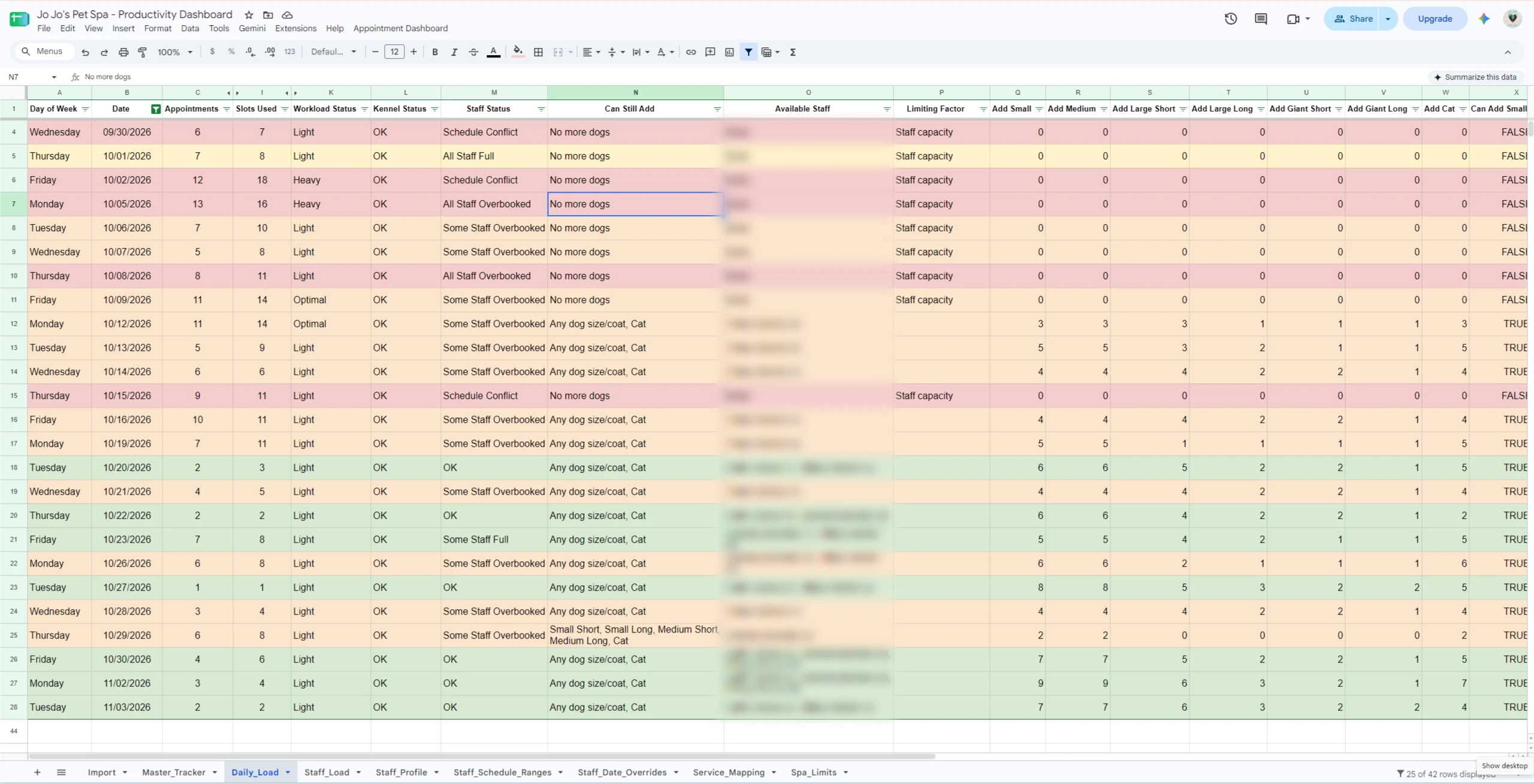
Daily Load helps staff find days with room and identify what kinds of dogs can still be added without creating workload, staffing, or kennel problems.
What the view shows
Staff Load — the diagnostic drill-down
Staff Load answers a narrower question, where is the constraint?
Daily Load is the planning view. Staff Load is the troubleshooting view. When Daily Load flags staff capacity as the constraint, Staff Load provides the detail needed to see which groomer is overloaded, how much capacity remains, and whether schedule overrides are affecting the day.
Staff Load
Where is the constraint?
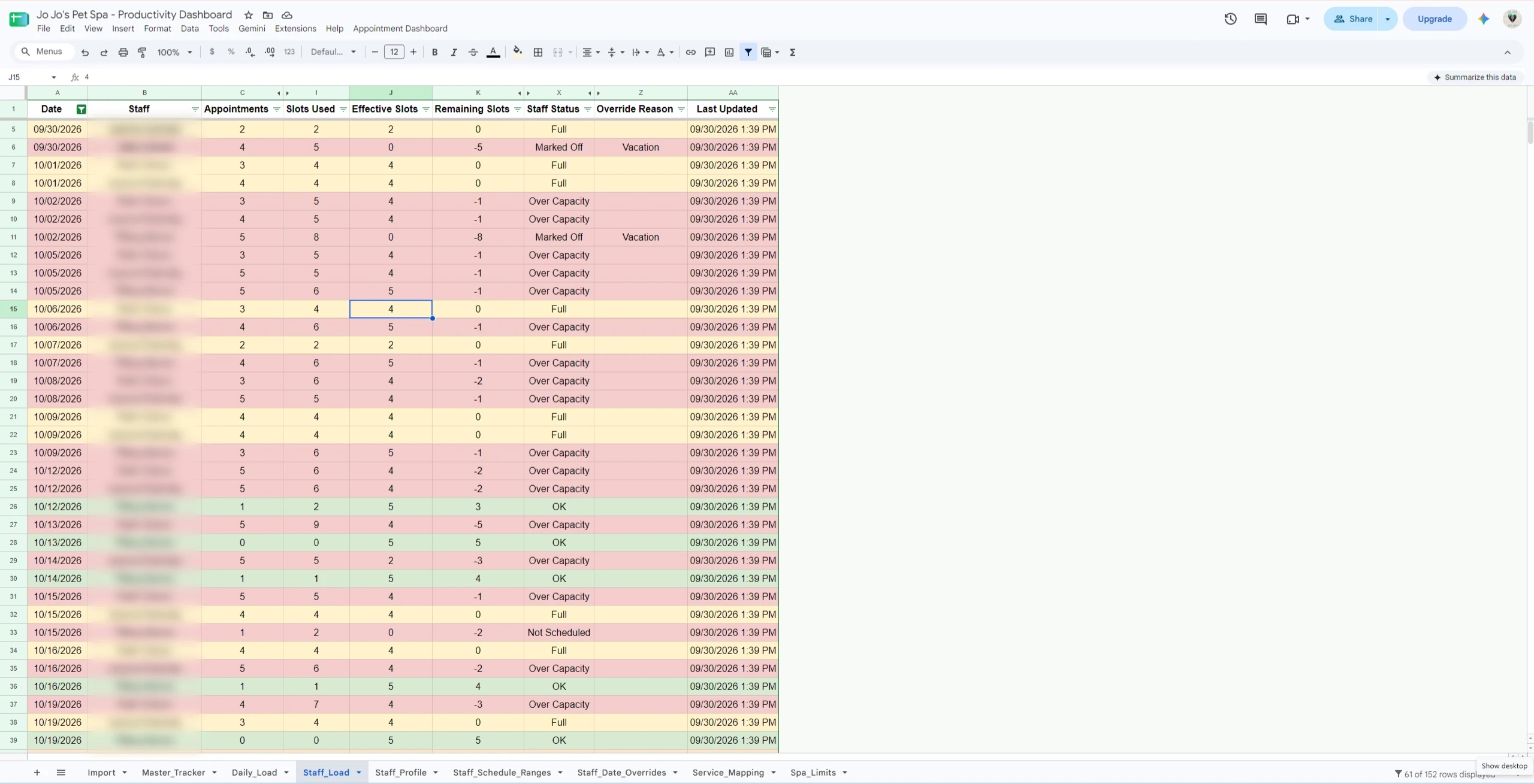
Staff Load shows each groomer's appointments against effective capacity, with schedule overrides such as vacation reflected in the day.
What the view shows
Three views, three decisions
Each view answers a different operating question, at a different level of detail.
They are three levels of information for three decisions, not three redundant dashboards.
Master Tracker
What needs attention?
Daily appointment preparation
Daily Load
What can we still schedule?
Primary planning view
Staff Load
Where is the constraint?
Diagnostic drill-down
Decision support, not automated scheduling
The system changed when the team could see a problem, not who made the call.
12–15 dogs functioned as an operating reference range, not an automated hard ceiling.
Staff used the capacity views to help limit overbooking, but people made the scheduling decisions. The logic continued to be refined as schedules and staffing changed.
Described from direct use of the system. No percentage or count is claimed.
What became possible
- Overloaded days became visible earlier
- Staff could identify constraints before the day was underway
- Appointments could be redistributed when appropriate
- Staff could prepare for heavy days that could not be changed
- Accidental overload of an individual groomer became easier to spot
What stayed with people
- Groomers could voluntarily choose to take on additional work
- Operational judgment remained part of every decision
- Scheduling decisions stayed human
PrincipleThe system supported decisions rather than making them automatically.
In use by the team
It is an active operational tool, not a concept prototype.
The workbook is used collaboratively by the front desk, the owner, the groomers, and me. Staff were trained to use it.
The Master Tracker is used every day by staff, as one of the salon's primary operational tools.
Used collaboratively by
Capacity lived in the whole day, not the calendar.
A calendar can show empty space. The Master Tracker, Daily Load, and Staff Load helped the team see what needed attention, whether that space was usable, and where the constraint was, all alongside the software the salon already relied on.
Capacity is not simply how much space is left. It is the work the available people can realistically perform.